How Securly Pass Is Silently Transforming K-12 Hallway Safety and Screen Time
A single misplaced hall pass used to mean a five-minute interruption, a scribble on a piece of paper, and zero visibility once a student walked out the door. Today, administrative data reveals that up to 15% of a typical school day is inadvertently spent out of seat, often drifting through hallways. Installing securly pass—the digital management system formerly known as e-Hallpass—has fundamentally reshaped how American K-12 schools monitor student movement, safeguard campus boundaries, and protect precious instructional hours.
Instead of treating hallway movement as an unmonitored free-for-all, schools now manage physical spaces with the same digital precision they use for attendance and grading.
The Shift From Paper Slips to Digital Hallway Management
For generations, classroom permissions relied on wooden blocks, plastic clipboards, or scribbled slips of paper. These traditional systems shared a glaring flaw: once a student crossed the classroom threshold, educators had virtually no way to track their destination or elapsed time.
Modern campus security demands a clearer picture. Digital hall pass software bridges the gap between classroom autonomy and administrative oversight. By shifting pass requests to a central cloud network, administrators gain instantaneous visual data on who is out of class, where they are heading, and how long they have been away.
This transition isn’t just about record-keeping; it directly impacts overall school climate. Research from the National Center for Education Statistics (NCES) highlights that school safety measures and clear behavioral tracking contribute significantly to reduced campus disruptions and improved learning environments. When movement becomes visible, unauthorized wandering drops dramatically.
Core Capabilities: Inside the Securly Pass Infrastructure
At its foundation, Securly Pass automates hallway logistics to eliminate common friction points between students, teachers, and school safety officers.
Real-Time Visual Dashboards
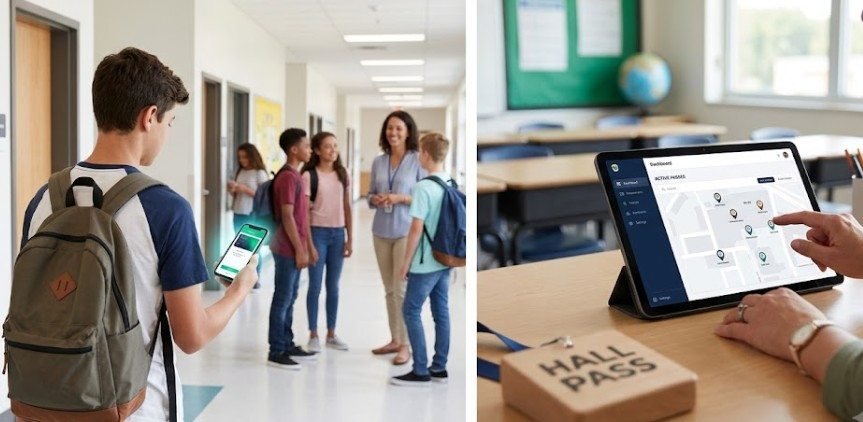
Teachers and administrators access a live dashboard displaying every active pass across the building. Color-coded timers highlight how long a student has been away, allowing staff to spot unusual delays immediately without making phone calls to the main office.
Automated Queueing and Room Limits
To stop crowded restrooms from becoming hubs for vaping or misbehavior, staff can set strict capacity limits on specific building zones. If a destination is full, the system places the student into a virtual queue right on their device, auto-issuing the pass only when a slot opens up.
Strategic Contact Control
One of the platform’s most protective elements is the ability to block designated student pairs or groups from holding active passes at the same time. This feature proactively prevents planned hallway meetups, bullying incidents, or peer conflicts before they happen.
| Feature | Paper Pass System | Securly Pass System |
| Visibility | Isolated to single classroom | Campus-wide, real-time dashboard |
| Capacity Management | None (causes hallway crowding) | Automated room limits and virtual queues |
| Conflict Prevention | Manual monitoring only | Dynamic “Contact Control” pairing blocks |
| Substitute Access | High risk of lost or misused slips | PIN-based approval system without extra logins |
Streamlining Daily Workflows for Staff and Substitutes
Implementing new technology can strain school staff if the daily workflow feels clunky. Securly Pass keeps the approval process simple, using single sign-on (SSO) through existing Google or Microsoft school accounts.
Students submit pass requests directly from their 1:1 laptops or tablets. The classroom teacher receives a subtle pop-up notification on their computer screen, allowing them to approve or deny the pass with a single click. Hallway monitors can verify any student’s pass status in real time using a tablet or smartphone—no physical paper required.
Substitute teachers often struggle with unfamiliar roster systems. Securly Pass solves this by providing temporary substitute PINs. Subs can quickly validate and close out passes right from the desk computer without needing full administrative account credentials.
Evaluating the Impact: A Practical Readiness Checklist
Adopting digital pass software requires careful preparation across IT, administration, and teaching staff. School leadership can use this quick evaluation checklist to measure campus readiness before rolling out the system:
- Infrastructure Check: Are 1:1 student devices fully integrated with reliable building-wide Wi-Fi coverage in all hallways and common areas?
- Identity Integration: Is your school’s student information system (SIS) synced with Google Workspace or Microsoft Entra ID for seamless single sign-on?
- Policy Standardization: Have clear, uniform rules been established for maximum pass durations (e.g., 5 minutes for restrooms, 15 minutes for guidance)?
- Substitute Strategy: Is a standardized method in place to distribute daily substitute PINs alongside traditional sub folders?
- Meta Title: Securly Pass Guide: Improving School Safety & Hallway Pass Management
- Meta Description: Discover how Securly Pass streamlines K-12 hall pass tracking, protects classroom time, improves campus security, and prevents hallway disruptions.
- Communication Plan: Have families received clear information detailing how digital passes protect student safety without compromising their privacy?
Real-World Limitations, Misconceptions, and Exceptions
While digital hall passes offer substantial benefits, they are not a magic fix for every campus challenge. Understanding potential drawbacks helps administrative teams set realistic expectations.
A common misunderstanding is that digital tracking infringes on personal student privacy. Securly Pass tracks building movement and timestamps—it does not track location outside school grounds or access personal phone data.
Additionally, emergency exceptions must be built into campus protocols. During a true medical emergency, a student should never be delayed by waiting for a digital pass approval. Teachers need explicit administrative backing to bypass the digital queue when immediate health or safety is at stake.
Finally, technical downtime can happen. School policies should always maintain a simple, analog backup plan (such as standard sign-out sheets) so instruction isn’t disrupted if the internet stutters.
Frequently Asked Questions
1. What happens if a student loses internet access while out of class?
The pass remains active on the central system. Hallway monitors check active pass lists using their own connected devices, so a student’s offline status won’t invalidate their approved pass.
2. Can parents track their child’s hall passes in real time?
No. Securly Pass is designed specifically for internal school operation. Parents do not have direct access to live pass tracking, ensuring operational privacy and administrative control within the building.
3. How does the system handle medical accommodations?
Administrators can set custom pass allowances for specific students. Those with documented medical needs receive adjusted time limits, unlimited pass requests, or priority queueing that bypasses standard daily restrictions.
4. Does Securly Pass require students to carry smartphones?
No. Students request passes through their school-issued Chromebooks, laptops, or tablets. Teachers can also issue passes directly on behalf of a student using the teacher dashboard.
Modern school security depends on clear, actionable data rather than guesswork. By replacing outdated paper passes with digital movement management, schools build safer environments, protect instructional time, and significantly lower hallway behavioral issues.
Upgrading hall pass management isn’t about restricting student freedom—it’s about creating an organized, accountable, and transparent campus where learning stays front and center. To explore official research on student privacy standards and modern school safety guidelines, visit the U.S. Department of Education resource hub.